
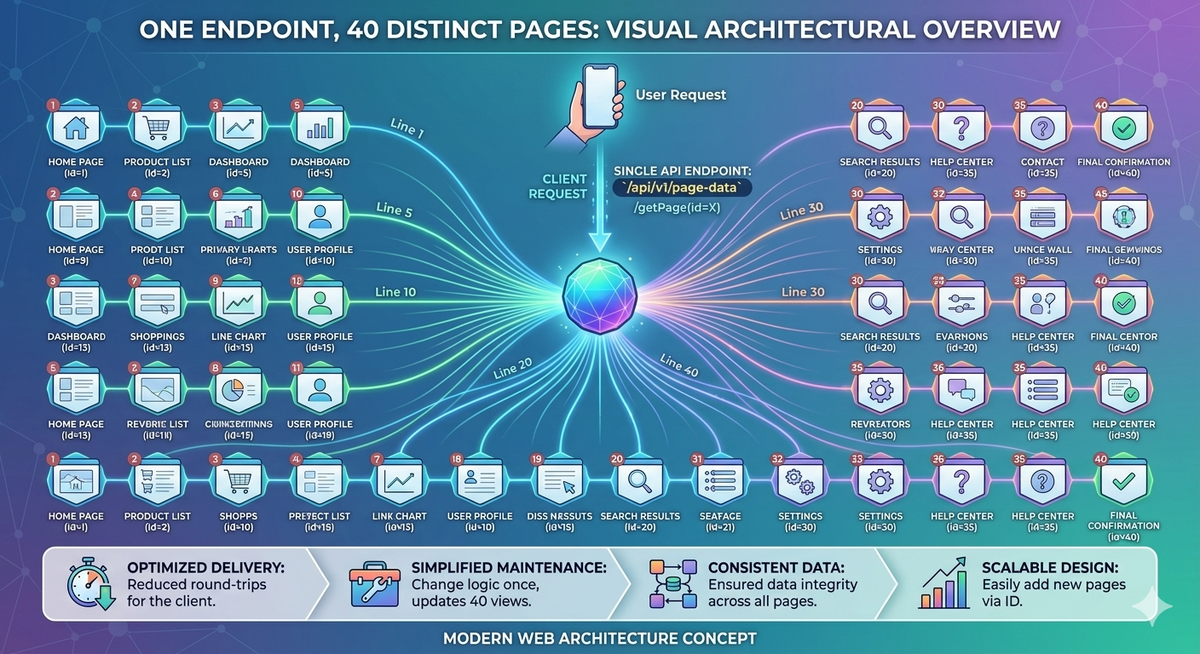
The Problem: 40 Admin Pages, One Developer
I was building a back-office system for a trading platform. The requirements were familiar to anyone who has built internal tools: accounts, balances, orders, commissions, reports, risk dashboards - about 40 distinct data views, each with filtering, sorting, actions, inline editing, and role-based permissions.
The traditional Django approach would be: write a template for each page, a view for each page, URL patterns for each page, form classes for each action, and JavaScript for each interaction. Multiply that by 40, and you are looking at months of repetitive work and a codebase where changing a table column means editing HTML, JavaScript, and Python in three different files.
I had already seen what Django admin could do with model introspection. But this was not a standard admin - it was a custom back-office with complex business logic, custom permissions, bulk operations, and API-driven data tables. Django admin's ModelAdmin was not flexible enough. I needed something that gave me the same "declare and render" power, but for arbitrary API-driven views.
So I built the blueprint system.
The Core Idea: A Page Is Just a Dictionary
The fundamental insight is that every admin page follows the same pattern: fetch data from an API, display it in a table with columns, let users filter and sort, provide actions on rows, and optionally allow inline editing. If the pattern is always the same, the only thing that changes between pages is the configuration.
A blueprint is a Python dictionary that describes everything about a page: what data to fetch, what columns to show, what filters to offer, what actions are available, and who has permission to see what. One generic template and one JavaScript module render every page - the blueprint just tells them what to render.
from frontend.blueprints import register_blueprint
from frontend.types import BlueprintDict
from frontend.filters import Filter
from django.urls import reverse_lazy


@register_blueprint(
    name="accounts",
    parent_menu="Accounts Management",
    menu_title="Account Management",
    menu_order=1,
)
def accounts_bp(request) -> BlueprintDict:
    return {
        "page_title": "Accounts",
        "data_url": reverse_lazy("account:accounts_v1"),
        "headers": {
            "ID": "id",
            "Account Name": "acc_name",
            "Currency": "currency.asset_name",
            "Group": "group.name",
            "Tariff Plan": "tariff_plan.name",
            "Is Active": "is_active",
        },
        "formatters": {"Is Active": "ToBool"},
        "filters": [
            Filter.DROPDOWN("Currency", "currency__id", "assets-filter"),
            Filter.DROPDOWN("Group", "group__id", "account-groups"),
            Filter.BOOLEAN("Is Active", "is_active", default_value=True),
        ],
        "actions": [
            {
                "title": "Edit",
                "color": "warning",
                "action": "openFormModal",
                "form_blueprint": "account_edit",
                "permission": "accounts_can_update",
            }
        ],
        "global_search": True,
    }
That is a complete admin page. Table with six columns, three filters, an edit button with permission control, global search, and automatic menu registration. No template file. No URL pattern to write. No JavaScript to configure. The decorator handles menu placement and URL generation. The generic view handles rendering.
The Blueprint Registry: Decorators That Build Navigation
The @register_blueprint decorator does more than store a function in a dictionary. It builds the entire navigation structure of the application:
# Global blueprint registry
BLUEPRINTS: Dict[str, Callable[..., BlueprintDict]] = {}


def register_blueprint(
    name: str,
    parent_menu: Optional[str] = None,
    menu_title: Optional[str] = None,
    menu_order: int = 100,
    menu_type: str = "section",
):
    def decorator(func):
        # 1. Register in global registry
        BLUEPRINTS[name] = func

        # 2. Auto-generate URL: "accounts" -> /int-data/accounts/
        url_name = name.replace("_", "-")
        url = reverse_lazy("int_view", args=[url_name])

        # 3. Register in menu hierarchy
        if parent_menu:
            register_blueprint_in_menu(
                blueprint_name=name,
                group_id=parent_menu.lower().replace(" ", "_"),
                title=menu_title or name.replace("_", " ").title(),
                url=url,
                order=menu_order,
            )
        return func

    return decorator
When a new app team adds a blueprint, the sidebar menu updates automatically. No manual menu configuration, no routing table maintenance. The blueprint is the registration. This is the same principle as Django admin's admin.site.register(), but applied to an entire application navigation system.
Type Safety: TypedDict as Living Documentation
One of the decisions that paid for itself immediately was using TypedDict for every blueprint structure. Instead of passing plain dictionaries and hoping the keys are correct, every blueprint conforms to a typed schema that IDEs understand:
from typing import Dict, List, Optional, Union
from typing_extensions import NotRequired, TypedDict


class HeaderFieldDict(TypedDict):
    field: str
    permission: NotRequired[Optional[str]]
    is_editable: NotRequired[Optional[bool]]
    round: NotRequired[Optional[bool]]
    formatter_args: NotRequired[Optional[tuple]]


class BlueprintDict(TypedDict):
    page_title: str
    data_url: str
    headers: Dict[str, Union[str, HeaderFieldDict]]
    formatters: NotRequired[Optional[Dict[str, str]]]
    filters: NotRequired[Optional[List[FilterDict]]]
    actions: NotRequired[Optional[List[ActionDict]]]
    static_actions: NotRequired[Optional[Dict[str, StaticActionDict]]]
    global_actions: NotRequired[Optional[Dict[str, GlobalActionDict]]]
    allow_update: NotRequired[Optional[bool]]
    global_search: NotRequired[Optional[bool]]
The TypedDict definitions serve triple duty: they are type annotations for mypy, autocomplete hints for IDEs, and documentation for developers. When someone writes a new blueprint, their editor tells them every available option, its type, and whether it is required. Misspell a key? The type checker catches it before the page loads.
This is not possible with plain dictionaries. And it is not possible with YAML or JSON config files either - you lose the IDE integration the moment you leave Python. Keeping blueprints as typed Python dictionaries gives you the flexibility of configuration with the safety of code.
The Filter System: Composable Query Builders
Filters are one of the most tedious parts of any data table. Each filter needs a UI component, a query parameter, and backend handling. Multiply that by the 20+ filter types we support and the 40 pages that use them, and you have a combinatorial explosion of repetitive code.
The blueprint filter system solves this with a Filter class that provides static methods for every filter type:
from frontend.filters import Filter

"filters": [
    # Dropdown - fetches options from API endpoint
    Filter.DROPDOWN("Account", "account__id", "accounts"),

    # Boolean - Yes/No selection with optional default
    Filter.BOOLEAN("Is Active", "is_active", default_value=True),

    # Number range - returns TWO filter configs (min + max)
    *Filter.NUMBER_RANGE("Amount", "amount"),

    # Date range - from/to pair
    *Filter.DATE_FROM_TO("Created", "created_at"),

    # Datetime range with apply button
    Filter.DATETIME_RANGE("Time Range", "transaction_time"),

    # Fixed date range - predefined periods
    Filter.FIXED_DATE_RANGE("Period", "created_at"),
    # Options: today, yesterday, this_week, last_7_days,
    # last_30_days, this_month, last_month, this_year, last_year

    # Static choices
    Filter.CHOICE("Status", "status", [
        {"id": "active", "name": "Active"},
        {"id": "pending", "name": "Pending"},
    ]),

    # Enum to choices conversion
    Filter.CHOICE("Risk", "risk_status",
        Filter.CHOICES_FROM_ENUM(RiskStatus)),

    # Multi-select dropdown
    Filter.MULTI_SELECT_DROPDOWN("Symbol", "symbol__in", "instruments"),
]
Each Filter method returns a dictionary that the JavaScript table renderer knows how to handle. The developer never writes filter HTML, never wires up event handlers, never builds query strings. They declare what they want filtered and the system handles the rest. The splat operator (*Filter.NUMBER_RANGE()) is particularly satisfying - a single call expands into two separate filter configurations for min and max.
Form Blueprints: Django Forms Without Form Classes
The table blueprint handles data display. But admin pages also need forms - create, edit, and bulk action forms. The traditional Django approach is to write a forms.Form or ModelForm class for each operation. With 40 pages and multiple actions each, that is a lot of form classes.
Form blueprints eliminate them entirely. A form is defined as a dictionary with field specifications, and a DynamicForm class generates the Django form at runtime:
from frontend.forms.forms import InputsFields, InputWidgets
from frontend.forms.blueprints import FORM_BLUEPRINTS, FormBlueprint

ACCOUNT_CREATE_BLUEPRINT: FormBlueprint = {
    "name": "account_create",
    "title": "Create Account",
    "description": "Create a new account",
    "column_count": 2,
    "modal_size": "xl",
    "method": "POST",
    "api_config": "account:accounts_v1",
    "success_message": "Account created successfully",
    "fields": [
        {
            "name": "acc_name",
            "type": InputsFields.CHAR_FIELD,
            "widget": InputWidgets.TEXT_INPUT,
            "label": "Account Name",
            "required": True,
            "max_length": 255,
            "row_class": "col-md-6",
        },
        {
            "name": "currency",
            "type": InputsFields.CHOICE_FIELD,
            "label": "Currency",
            "permission": "account_currency_update",
            "api_choices": "common:unified_search",
            "api_choices_args": ["assets-v1"],
            "api_choices_autocomplete": True,
            "row_class": "col-md-6",
        },
    ],
}

FORM_BLUEPRINTS["account_create"] = ACCOUNT_CREATE_BLUEPRINT
The DynamicForm class reads the blueprint and creates real Django form fields with proper widgets, validation, and layout. It maps InputsFields.CHAR_FIELD to forms.CharField, InputWidgets.TEXT_INPUT to forms.TextInput, and handles API-powered autocomplete dropdowns via Select2. The permission key on each field controls whether the current user can edit that field - if they lack the permission, the field renders as read-only instead of being hidden.
The DynamicForm Engine: Blueprint to Django Form
The magic happens in the DynamicForm class, which extends Django's forms.Form and dynamically creates fields from the blueprint configuration:
class DynamicForm(forms.Form):
    FIELD_MAP = {
        InputsFields.CHAR_FIELD: forms.CharField,
        InputsFields.CHOICE_FIELD: forms.ChoiceField,
        InputsFields.INTEGER_FIELD: forms.IntegerField,
        InputsFields.FLOAT_FIELD: forms.FloatField,
        InputsFields.BOOLEAN_FIELD: forms.BooleanField,
        InputsFields.DATE_FIELD: forms.DateField,
        # ... 16 field types total
    }

    WIDGET_MAP = {
        InputWidgets.TEXT_INPUT: forms.TextInput,
        InputWidgets.SELECT: forms.Select,
        InputWidgets.SELECT2: Select2Widget,
        InputWidgets.CHECKBOX_INPUT: forms.CheckboxInput,
        # ... 15 widget types total
    }

    def __init__(self, *args, **kwargs):
        self.request = kwargs.pop("request", None)
        self.submit_url = kwargs.pop("submit_url", None)
        super().__init__(*args, **kwargs)
        self.load_fields_from_config()  # Blueprint -> Django fields
        self._setup_crispy_form_helper()  # Layout with Crispy Forms

    def load_fields_from_config(self):
        for field_config in self.scheme.get("fields", []):
            field_class = self.FIELD_MAP[field_config["type"]]
            widget_class = self.WIDGET_MAP.get(field_config.get("widget"))
            # Build kwargs: required, max_length, label, help_text...
            self.fields[field_config["name"]] = field_class(**kwargs)
The FormRenderer class then takes this form, applies permission-based field restrictions (making fields read-only for users who lack the required permission), builds a submit URL from the blueprint's api_config, and renders everything into a Bootstrap modal via Crispy Forms. The entire pipeline - from dictionary to rendered modal with AJAX submission - requires zero template code from the developer.
The Request Flow: One View Serves 40 Pages
The entire blueprint system routes through a single Django view. Every page in the back-office hits the same URL pattern, the same view function, and the same template:
# urls.py - One URL pattern for everything
urlpatterns = [
    path("int-data/<str:view_blueprint_name>/",
         views.int_view, name="int_view"),
]

# views.py - One view function for everything
@login_required
def int_view(request, view_blueprint_name) -> HttpResponse:
    blueprint_key = view_blueprint_name.replace("-", "_")

    # Look up the blueprint function
    blueprint = BLUEPRINTS.get(blueprint_key)
    if not blueprint:
        raise PermissionDenied(f"Blueprint '{blueprint_key}' not found")

    # Check section-level permissions
    if not request.user.is_superuser:
        user_access = get_user_section_access(request.user, blueprint_key)
        if not user_access.get("can_read", False):
            raise PermissionDenied

    # Execute blueprint function and render
    context = blueprint(request)
    return render(request, "base_table_page.html", context)
The URL /int-data/accounts/ calls accounts_bp(request). The URL /int-data/balances/ calls balances_bp(request). Same view, same template, different data. The template receives the blueprint dictionary as context, serialises it into JSON script tags, and the JavaScript table renderer takes over.
Permissions at Every Layer
The blueprint system enforces permissions at three levels, and all of them are declared in the blueprint configuration - not in separate permission checks scattered across views:
- Section level: Can the user access this page at all? Checked in
int_viewbefore the blueprint function is even called. - Action level: Can the user see the Edit button? The Approve button? Each action in the blueprint has a
permissionkey. Actions are filtered client-side based on the user's role. - Field level: Can the user edit the currency field? The commission rate? Each form field has an optional
permissionkey. If the user lacks it, the field renders as read-only with a visual indicator - not hidden, because they should still see the data.
This layered approach means a single blueprint definition handles both the UI and the access control. There is no separate permissions file to maintain, no decorator stack on views, no template conditionals checking {% if perms.app.can_edit %}.
Nested Field Access and Formatters
Real-world data is never flat. An account has a currency, which has a name. An order has a trader, who has an email. The blueprint header system handles nested field access with dot notation:
"headers": {
    "ID": "id",                          # Simple field
    "Currency": "currency.asset_name",    # Nested: obj.currency.asset_name
    "Group": "group.name",               # Nested: obj.group.name
    "Risk Profile": "group.risk_profile.name",  # Three levels deep
    "Is Active": {                        # Advanced config
        "field": "is_active",
        "is_editable": True,              # Inline editable
        "permission": "accounts_can_update",
    },
    "Amount": {
        "field": "amount",
        "round": True,                    # Round numeric values
        "formatter_args": (2,),           # 2 decimal places
    },
},

# Formatters transform raw values into display values
"formatters": {
    "Is Active": "ToBool",       # true/false -> checkmark/cross
    "Account": "ToAccountLink",  # ID -> clickable link
    "Created At": "ToDateTime",  # ISO string -> formatted date
}
The JavaScript table renderer resolves "currency.asset_name" by walking the nested object from the API response. Formatters are JavaScript functions registered by name - the blueprint just declares which formatter to use for which column. Adding a new formatter is a single function definition, and it is instantly available to every blueprint in the system.
Global Actions: Bulk Operations From Configuration
One of the most powerful features is global actions - bulk operations that work on selected rows. The user checks multiple accounts, clicks "Change Risk Status", fills in a modal form, and all selected accounts are updated in one API call.
The entire flow is configured in the blueprint:
"global_actions": {
    "risk_status": {
        "permission": "account_risk_update",
        "title": "Change Risk Status",
        "description": "Update risk status for selected accounts",
        "form": serialize_blueprint_form("account_risk_status_bulk_action"),
        "app": "account",
        "url_name": reverse_lazy("account:bulk_updates_v1"),
        "method": "PATCH",
    },
    "activate": {
        "permission": "account_activate",
        "title": "Activate / Deactivate",
        "description": "Toggle active status",
        "form": serialize_blueprint_form("account_is_active_bulk_action"),
        "app": "account",
        "url_name": reverse_lazy("account:bulk_updates_v1"),
        "method": "PATCH",
    },
}
The serialize_blueprint_form function takes a form blueprint name, generates the Django form, renders it to HTML, and serialises it into the page context. When the user clicks the action, JavaScript opens a modal with the pre-rendered form, collects the selected row IDs, and submits everything via AJAX. Eight bulk actions on the accounts page, each with its own form, and the only code specific to each action is its blueprint definition.
What This Architecture Eliminates
After building 40+ pages with blueprints, here is what the codebase does not contain:
- Zero page-specific templates - every admin page uses
base_table_page.html - Zero page-specific JavaScript - the table renderer, filter handler, and action manager are generic
- Zero manual URL patterns per page - one URL pattern with a dynamic parameter serves everything
- Zero form class files - forms are generated from blueprints
- Zero manual menu registration - decorators build the sidebar automatically
Adding a new admin page is a single Python file with a decorated function that returns a dictionary. No new template, no new URL, no new JavaScript, no menu configuration. The 41st page takes the same effort as the 2nd.
The Django Admin Lineage
This system is a direct descendant of Django admin's philosophy. Django admin says: "Give me a model and I will build the UI." Blueprints say: "Give me a dictionary and I will build the UI."
The difference is that Django admin is tightly coupled to Django models and the ORM. Blueprints are decoupled from the data source - they work with any API endpoint, any data format, any backend. You could point a blueprint at a REST API, a GraphQL endpoint, or a static JSON file, and the rendering would be identical.
But the core insight is the same: if you describe your data structure and your interaction patterns, the framework can build the interface. You do not need to handcraft every table, every filter, every form, every permission check. You need to describe what you want, and let the system render it.
Django admin proved this was possible in 2005. Blueprints prove it scales to complex, custom, API-driven back-office applications in 2025.
A blueprint is not a shortcut - it is an assertion that admin pages are data, not code. The moment you accept that, the templates, the URL patterns, the form classes, and the JavaScript all become the framework's problem, not yours.